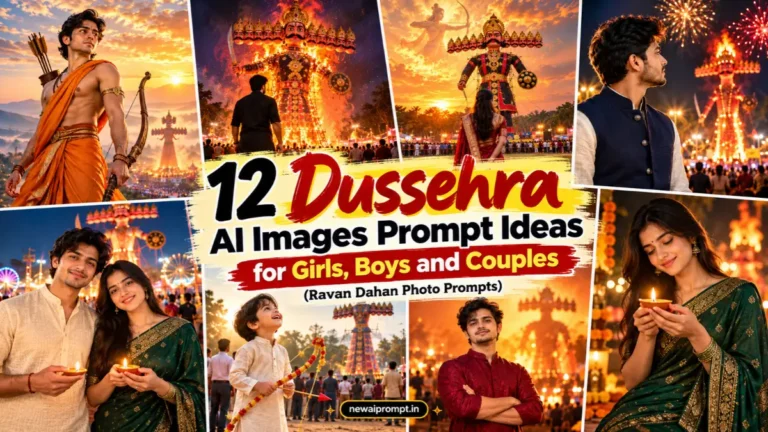
Dussehra photos look best when they feel like a real moment: a giant Ravan effigy in the distance, orange sunset clouds, marigolds, diyas and a crowd glowing in warm light. The prompts below are built for exactly that. Upload your own photo, paste a prompt into Gemini (Nano Banana), ChatGPT or any image tool that supports reference photos, and you get a premium, sharp, realistic festival image.
You will find prompts for girls, boys, couples and families, plus tips to keep your face accurate and the final image crisp.
Quick Answer: How to Use These Dussehra AI Photo Prompts
- Upload one clear, front-facing, well-lit photo of yourself (no heavy filters, no sunglasses).
- Paste one prompt from the list below.
- Choose the aspect ratio mentioned in the prompt (9:16 for Instagram Stories and Reels, 4:5 for feed posts).
- If the face drifts, regenerate and repeat the identity instruction at the end of the prompt.
Dussehra AI Photo Prompts for Girls
1. Red Saree Back View With Giant Ravan Effigy

A cinematic rear-view portrait: you stand small in the foreground while a towering Ravan effigy fills the middle of the frame. A faint divine glow in the clouds adds the mythological feel without stealing focus.
Use the attached reference image and keep the person’s face, facial features, and identity exactly the same, with no changes to her appearance. Create a vertical 9:16 ultra HD photograph of her standing in the lower center of the frame with her back to the camera, wearing a deep red silk saree with a wide golden border, the pallu falling naturally down her back, gold jhumkas and thin bangles visible. Her hands rest lightly behind her waist. In front of her, across a wide grassy Dussehra ground, a gigantic Ravan effigy with ten heads in a row, a gold crown, a thick moustache and black-red-gold costume rises above a distant crowd. Soft golden-hour sun glows behind the effigy, the sky is full of burning orange clouds, and a faint translucent silhouette of Lord Rama with a bow is visible high in the clouds. Full body visible including feet, wide-angle lens at eye level, razor-sharp focus, natural skin and fabric texture, HDR, photorealistic, 8K-level detail. No text, no watermark, no cartoon look, no extra fingers.
Best for: Instagram Stories, WhatsApp status and festival wallpapers.
2. Yellow Anarkali Close-Up With Diya and Blurred Effigy

A close portrait changes the mood completely. The effigy becomes a soft orange shape behind you, so your face stays the hero.
Take the person from the uploaded photo and recreate her with the identical face, skin tone and features, without altering her identity in any way. Create a 4:5 portrait, chest-up, of her holding a lit brass diya close to her face with both hands. She wears a mustard-yellow anarkali with fine embroidery, small pearl earrings and a tiny bindi. Behind her, a tall Ravan effigy is blurred into creamy bokeh with warm string lights and crowd silhouettes. Shot on an 85mm portrait lens at f/1.8, flame light warming her cheeks, dusk sky in deep orange and violet, sharp eyes, visible skin pores, clean hair strands, premium ultra HD, realistic and not over-smoothed.
Best for: profile pictures and close-up Dussehra posts.
3. Shami Puja Thali in a Traditional Courtyard
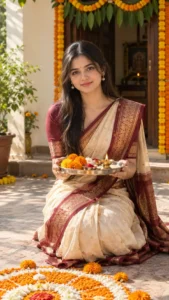
Not every Dussehra image has to show fire. This one captures the quiet, auspicious side of Vijayadashami with a puja thali and marigolds.
Using the attached photo as the face reference, preserve her exact face and natural look so she remains perfectly recognizable. Create a vertical 9:16 image of her kneeling gracefully in a sunlit courtyard, wearing a cream and maroon cotton-silk saree, holding a steel puja thali with kumkum, rice, a diya and fresh marigolds. A rangoli with orange and white petals is in front of her, a decorated entrance with mango leaves and marigold toran behind her. Soft morning side light, shallow depth of field, calm and devotional expression, warm earthy colors, sharp textures on the fabric and petals, ultra HD realistic photography.
4. Red and White Saree With Dhunuchi Smoke

Inspired by the Bengali Vijayadashami look, this prompt brings in smoke and light for a dramatic, film-style result.
Keep the face from the reference photo exactly as it is, with every facial detail and her identity untouched. Show her in a white saree with a red border and a red sindoor-style tilak, smiling softly at the camera, in a temple-style pandal at dusk. Thin dhunuchi smoke curls through glowing orange lamps behind her, and a blurred goddess idol is visible in the background. Cinematic medium shot, 50mm lens, warm rim light on her hair and shoulders, slight haze for depth, rich red and gold palette, crisp detail, premium quality, photorealistic.
5. Rooftop Ravan Dahan Wide Shot
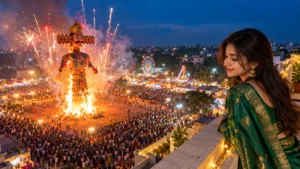
A wide, high-angle composition that feels like a travel photographer captured it. Great when you want the whole event in one picture.
Reference photo attached: her face, features and identity must stay completely unchanged, matching the photo precisely. Create a 16:9 wide photograph from a rooftop, with her standing at the right third of the frame in a bottle-green silk saree, leaning lightly on the railing and looking down at the festival below. A huge Ravan effigy is just catching fire, with sparks and fireworks rising into a deep blue evening sky, and thousands of small lights from the crowd glowing below. Wide-angle lens, slightly elevated perspective, strong contrast between cool sky and orange fire light, sharp architectural detail, ultra HD, realistic.
Dussehra Ravan Dahan AI Photo Prompts for Boys
6. Black Kurta Back View in Front of Burning Ravan
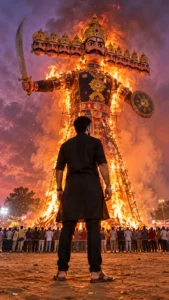
This one is for a dramatic, powerful look. The low camera angle makes both you and the effigy feel larger than life.
Follow the uploaded reference exactly for his face, hair and skin tone, and do not change his identity or appearance. Create a vertical 9:16 low-angle photograph of him seen from behind in the lower center, wearing a black cotton kurta with sleeves folded to the elbows, fitted pants and brown leather sandals. He stands with arms relaxed at his sides. Ahead of him a colossal Ravan effigy begins to burn, flames climbing from the base, orange sparks drifting upward against a smoky purple-orange sky. A large crowd stands at a safe distance behind a rope line. Ultra-wide cinematic framing, dramatic fire glow on the edges of his shoulders, fine fabric and hair detail, razor sharp, HDR, premium 8K-style realism.
6B. Variation: Daytime Mela Version

Use the same face and identity as the attached reference photo, with no edits to his features. Create a bright 4:5 daytime photo of him in a white linen kurta walking through a Dussehra mela, with colorful stalls, balloons, a Ferris wheel and a half-built Ravan effigy behind him. Candid, natural stride, looking sideways with a relaxed smile. Soft midday sun, saturated festival colors, 35mm street-photography look, sharp subject and gently blurred background, ultra HD, realistic skin texture.
7. Cream Kurta and Nehru Jacket Side Profile Under Fireworks

A formal, festive portrait that works well for greetings and WhatsApp DPs.
Preserve the man’s real face and every distinguishing feature from the supplied photo, so he looks exactly like himself. Create a 4:5 side-profile portrait of him in a cream kurta with a navy Nehru jacket, looking toward a glowing Ravan effigy in the distance. Fireworks burst in gold and red across a night sky, and their light paints a thin warm outline along his jaw and hair. Medium shot, 70mm lens, shallow depth of field, deep shadows with controlled highlights, crisp details on the jacket buttons and fabric weave, premium ultra HD portrait quality.
8. Rama-Inspired Warrior Portrait (Respectful, Cinematic)
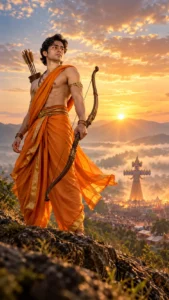
Many people search for Rama-inspired Dussehra edits. Keep this one respectful: it is a portrait inspired by the Vijayadashami story, not a claim to depict the deity.
Match the face in the reference photo exactly, keeping his identity, expression style and natural features unchanged. Create a vertical 9:16 epic portrait of him in a saffron dhoti and a simple gold shoulder ornament, holding a wooden bow with calm confidence, standing on a hill at sunrise. In the far background, a tall Ravan effigy is visible in the valley beneath rising mist. Heroic low-angle composition, soft golden backlight, light wind moving the fabric, painterly clouds but photographic realism, sharp bow grain and skin detail, ultra HD, no cartoon look.
9. Studio Greeting Poster With Space for Text
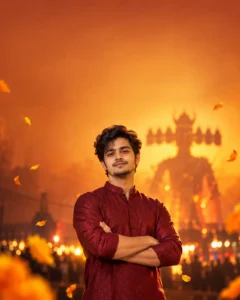
If you plan to add your own “Happy Dussehra” text in Canva or Photoshop, ask the AI to leave empty space. It saves a lot of editing time.
The uploaded photo is the single identity reference: keep his face, hairstyle and features perfectly consistent with it. Create a clean 4:5 festive portrait of him in a maroon kurta, arms crossed, looking confidently at the camera, standing in the lower half of the frame. The upper half is a smooth gradient of burnt orange and gold with a faint, softly blurred Ravan silhouette and a few floating marigold petals, leaving open negative space for text. Studio lighting with a warm key light and subtle rim light, sharp focus on the face, polished and premium, ultra HD.
Couple and Family Dussehra AI Photo Prompts
10. Couple With Diyas at Night

Use the attached reference photos and keep both people’s faces, features and identities exactly as they are, with no blending between them. Create a 4:5 romantic festive photo of the couple standing shoulder to shoulder, the woman in an emerald green saree and the man in an ivory kurta, each holding a small lit diya. Behind them, a giant Ravan effigy glows against a dark blue night with warm festival lights blurred into bokeh. Medium-wide shot, 50mm lens, soft diya light on their faces, natural smiles, sharp eyes and clothing texture, realistic ultra HD photography.
11. Family Portrait at Home With Dussehra Decor
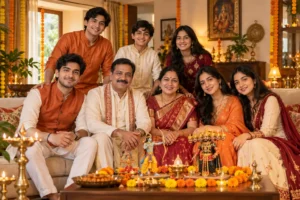
Treat the uploaded photo as the strict face reference for every family member visible, and leave all faces and identities untouched. Create a warm horizontal 3:2 family portrait in a living room decorated for Dussehra, with marigold garlands, brass lamps and a small tabletop Ravan and Rama figurine set. Everyone wears coordinated traditional outfits in orange, cream and maroon, seated and standing naturally in two rows. Soft window light plus warm lamps, balanced exposure, even sharpness across all faces, true-to-life skin tones, premium ultra HD.
12. Child With Paper Bow Before the Effigy
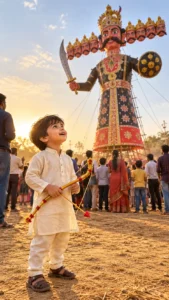
Retain this child’s exact face, hair and identity from the reference image, and do not stylize or change the appearance. Create a vertical 9:16 photo of the child in a kurta pajama, holding a small decorated toy bow and looking up in wonder at a tall Ravan effigy, standing safely among family members at a distance. Late afternoon sun, golden dust in the air, wide cinematic frame from child height, joyful expression, sharp natural detail, ultra HD, wholesome and realistic.
How to Get Sharper, More Realistic Dussehra AI Images
- Use a good source photo. A clear, evenly lit, front-facing photo gives the AI more to work with than a dark or blurry one.
- Say what should stay the same. Mention your face, hairstyle and skin tone explicitly, as the prompts above do.
- Pick one main subject. If the effigy, crowd, fireworks and clouds all compete, the image gets messy. Keep one hero element.
- Describe fabric and light. Words like “silk saree with golden border” and “golden-hour backlight” help far more than “beautiful” or “nice”.
- Choose the right ratio. Use 9:16 for Stories and Reels, 4:5 for the Instagram feed, 16:9 for wide scenes.
- Retry instead of rewriting. If one detail is wrong (for example the number of Ravan heads), regenerate and add that one correction.
Common Mistakes to Avoid
- Uploading a heavily filtered selfie, which often makes the face look plastic.
- Writing very long prompts with conflicting instructions, such as “night” and “bright afternoon sun”.
- Asking for too many characters in the clouds, which can distort faces.
- Forgetting to mention full-body framing when you want shoes or feet visible.
Which AI Tool Should You Use?
These prompts are written as plain text, so they can be adapted for Gemini (Nano Banana), ChatGPT image generation and other tools that accept a reference photo. Results vary by tool and by how recognizable your uploaded photo is, so it is worth trying the same prompt in more than one tool.
FAQs
What is a Dussehra AI photo prompt?
It is a written instruction that tells an AI image tool how to turn your uploaded photo into a Dussehra-themed picture, including outfit, background, lighting and pose.
Can I use these prompts in Gemini and ChatGPT?
Yes. Upload your photo first, then paste the prompt. If a tool does not support reference photos, the face may not match.
How do I keep my face unchanged?
Use a clear source photo and keep the identity instruction in the prompt. If the face still changes, regenerate and shorten the rest of the prompt.
Can I change the outfit or colors?
Yes. Replace the outfit, color or background in the prompt and keep the camera and lighting details unchanged.
Are these prompts good for a Ravan Dahan photo for boys and girls?
Yes. Prompts 1 to 5 are written for girls, 6 to 9 for boys, and 10 to 12 for couples, families and children.