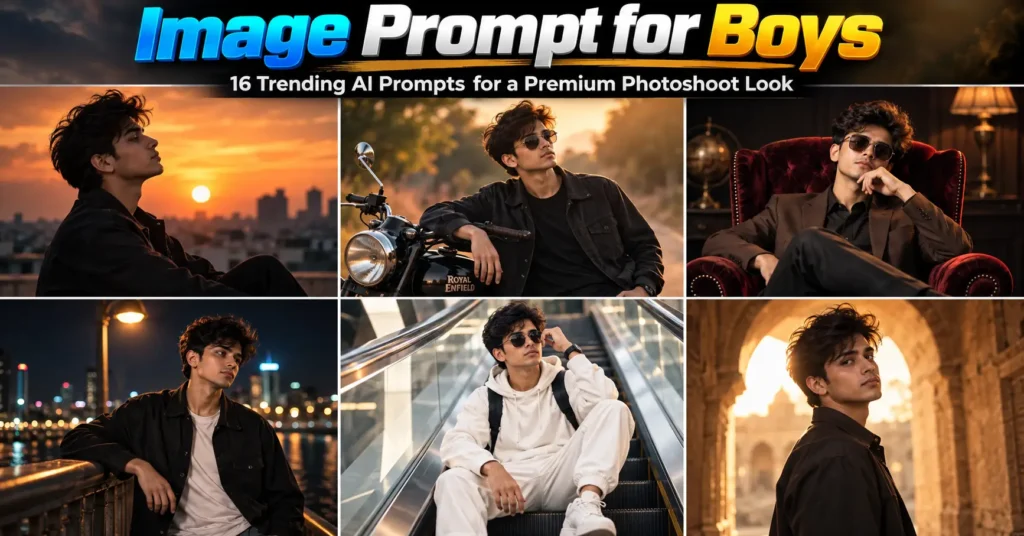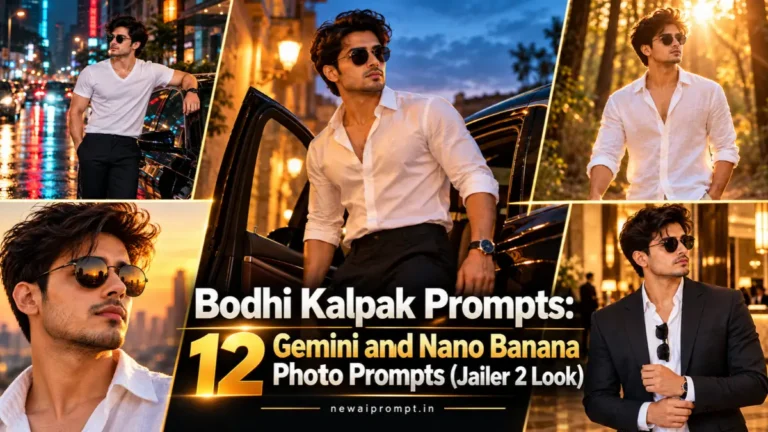
If you have seen white-shirt, dark-sunglasses AI photos with a luxury car in the background on Instagram, Reels or YouTube, that is the Bodhi Kalpak look. People upload a selfie to Gemini and ask it to recreate the style of the character’s entrance. This page gives you 12 ready-to-use prompts that keep that signature look but change the location, camera angle and lighting, so your photos do not all look the same.
What Is Bodhi Kalpak?
Bodhi Kalpak is a character in the Tamil film Jailer 2, played by S. J. Suryah. The film is directed by Nelson, produced by Sun Pictures, with music by Anirudh Ravichander, according to DT Next.
The character was introduced through a short video with no dialogue. Per The Hollywood Reporter India, Suraj Venjaramoodu’s voice introduces him as Bodhi Kalpak, and he is shown coming out of a swanky car. Because the intro depends so much on styling and presence, it translates easily into AI photo prompts: a crisp white outfit, round sunglasses, a confident walk and a cinematic setting.
These prompts are made for editing your own photo in that style. They do not ask the AI to copy any actor’s face.
Quick Answer: How to Use a Bodhi Kalpak Prompt
- Open Gemini (Nano Banana image editing) or ChatGPT image generation.
- Upload one clear, front-facing photo of yourself.
- Paste one prompt exactly as written.
- Generate, then ask for small fixes such as “make the sunglasses slightly smaller” instead of rewriting everything.
Choose the Right Source Photo First
Your reference photo matters more than any prompt. Use a sharp, evenly lit, front or three-quarter shot with your whole face visible. Avoid heavy filters, sunglasses in the original, and group photos. A clean photo gives the model more facial detail to preserve.
Car Entry and Street Prompts
The car entrance is the most recognisable part of the character’s intro, so the first three prompts explore it from different angles and times of day.
1. Stepping Out of the Car Door
This one recreates the “just got out of the car” moment from a low angle at dusk.
Using the attached photo as the only face reference, preserve the person’s identity, facial features and appearance exactly as they are, with zero modification.
Create a high-resolution cinematic frame of him stepping out of the open door of a dark luxury car parked on a quiet old-town street at dusk. White cotton shirt with the top two buttons open, black trousers, black round sunglasses, a thin watch on the wrist. Low camera angle from near the ground, 35mm lens, warm streetlight from the left and cool blue sky behind. Sharp focus on the face and shirt, gentle background blur, realistic photography, 16:9 widescreen.
Best for: YouTube thumbnails and wide banners.
2. Rainy Night Street with a Black Sedan
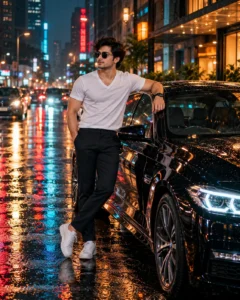
Wet roads, neon reflections and a cool teal-and-amber grade give this the heaviest movie feel.
Use the attached reference image and keep the person’s face, facial features, and identity exactly the same — no changes to their appearance.
Create an ultra HD, razor-sharp full-body photo of him standing beside a polished black luxury sedan on a rainy city street at night. He wears a fitted white V-neck t-shirt, dark slim trousers and round black sunglasses, one hand relaxed at his side, the other resting on the car roof. Wet asphalt reflects neon signs and warm shop lights. Shot on a 50mm lens at eye level, shallow depth of field, soft rim light on the shoulders, cinematic teal and amber color grade, 4:5 vertical frame.
Best for: Instagram posts and Reel covers.
3. Crosswalk Walk with Telephoto Compression
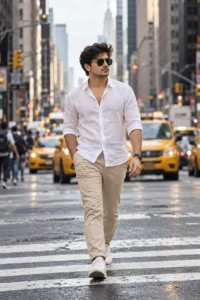
A long lens squeezes the buildings behind him and makes the walk feel like a film still.
Keep the face and identity from the uploaded photo completely unchanged. Do not alter his facial structure, skin tone or features in any way.
Generate a premium, ultra-sharp street photograph of the same man walking toward the camera across a busy downtown crosswalk in soft overcast daylight. He wears an untucked white linen shirt with sleeves rolled to the forearms, beige chinos and dark aviator-style sunglasses. Use an 85mm telephoto look with compressed background, tall buildings and blurred yellow taxis behind him. Natural skin texture, crisp fabric folds, muted filmic colors, 2:3 portrait ratio.
Tip: If the crowd looks messy, add “only a few distant pedestrians, softly blurred”.
Golden Hour and Nature Prompts
4. Forest Path at Sunset

The white linen shirt glows gold in backlight, which is why this version is so popular.
Please keep the face in the attached image completely unchanged. His identity, bone structure and expression style should match the original exactly.
Create an ultra HD portrait of him walking along a sunlit forest trail during golden hour. He wears a loose white linen shirt open at the collar, light khaki trousers and dark round sunglasses. Strong backlight creates a warm halo around his hair, with glowing sun flares through the trees and creamy bokeh. Waist-up framing, 85mm lens at f/1.8, visible fabric texture, natural skin detail, warm earthy tones, 4:5 ratio.
5. Open Field with Wind in the Shirt
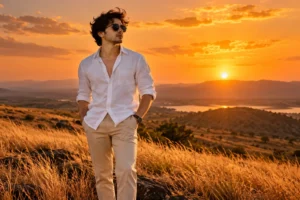
Wind movement gives a still image energy. Good for reel thumbnails.
Treat the uploaded photo as a strict identity reference: his face, features and overall look must stay identical to the original, with nothing retouched or reshaped.
Generate a wide cinematic photo of him standing in a dry golden grass field at sunset, strong breeze moving his white shirt and hair. Black sunglasses, beige trousers, hands in pockets, calm confident posture. Camera placed slightly below eye level, 28mm lens, long shadows stretching across the grass, a hazy orange sky with soft clouds. Sharp subject, deep detail, rich warm color grade, 3:2 landscape ratio.
6. Desert Highway, Wide Hero Shot
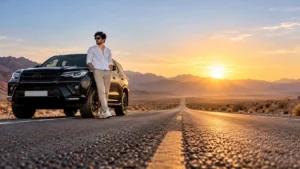
The person is small in the frame and the empty road does the storytelling.
Treat the attached photograph as a locked face reference. His face, features and identity are to remain exactly as in the original, untouched.
Generate an ultra HD wide shot of him standing in the middle of an empty desert highway beside a black SUV, a distant mountain range under a clear sunrise sky. White shirt blowing slightly, beige trousers, black sunglasses, arms relaxed. Camera low on the road surface, 24mm wide lens, long leading lines of the road toward the horizon, soft dust in the air, warm golden light from behind, crisp detail, 16:9 ratio.
Close-Up, Studio and Editorial Prompts
7. Black and White Studio Portrait
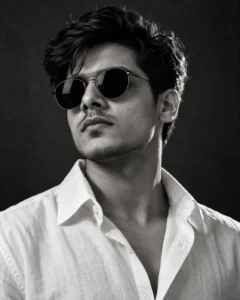
Without color, all attention goes to the face, the sunglasses and the collar.
Using the attached reference photo, hold the face, facial features and identity perfectly consistent with the original. He should look like the same person, with no edits.
Create a high-contrast black and white studio portrait, chest-up, against a dark gray seamless backdrop. White shirt with a crisp open collar, round dark sunglasses, chin slightly lifted, a serious look. Single softbox from the side with a subtle rim light, 100mm portrait lens, razor-sharp eyes and skin texture, fine film grain, deep shadows, editorial magazine feel, 4:5 ratio.
8. Close-Up with Skyline Reflection in the Sunglasses
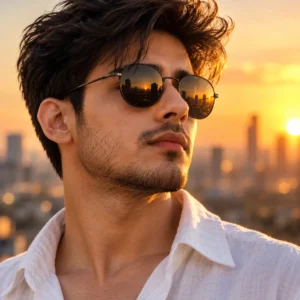
A tight crop where the lenses reflect a blurred city at golden hour.
Use the uploaded reference photo and preserve the exact same face, features and identity. Do not change anything about how the person looks.
Generate an extreme close-up portrait from the collarbone up. Black round sunglasses reflect a blurred city skyline at golden hour. White linen collar visible at the bottom of the frame. Soft warm side light across the cheek, 135mm lens look, very shallow depth of field, ultra-detailed skin pores and stubble, calm neutral expression, warm cinematic tones, 1:1 square ratio.
9. Luxury Hotel Lobby, Tailored Look
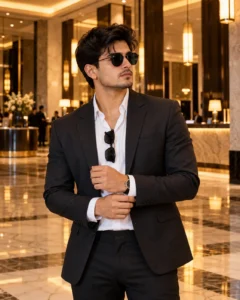
A dark blazer over the same white shirt, shot in a warm, polished interior.
With the attached image as the reference, keep the person’s face, facial details and identity precisely as they are, free from any change or beautification.
Create a premium lifestyle photo of him standing in a marble hotel lobby with warm pendant lights. Charcoal blazer over a white shirt with no tie, black sunglasses tucked into the shirt collar, one hand adjusting his cuff. Camera at chest height, 50mm lens, soft amber highlights on the marble floor, subtle reflections, sharp focus, rich realistic textures, 4:5 ratio.
Cinematic and Story-Based Prompts
10. Old Heritage Street with Warm Tungsten Light
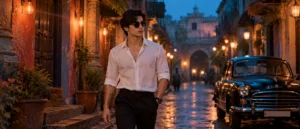
A movie-still style frame with painted walls, hanging bulbs and a quiet blue-hour mood.
Make sure the face from the reference image stays the same, including every feature and the overall identity. No changes to his appearance.
Create a cinematic movie-still style image of him walking slowly through a narrow heritage street at blue hour, with colorful old walls, hanging tungsten bulbs and a parked vintage car in the background. White shirt, dark trousers, round black sunglasses, a quiet intense look. Anamorphic lens look with gentle horizontal flares, shallow depth of field, soft film grain, teal shadows with orange highlights, ultra-sharp subject, 2.39:1 widescreen feel.
11. Rooftop at Sunset as the City Lights Come On
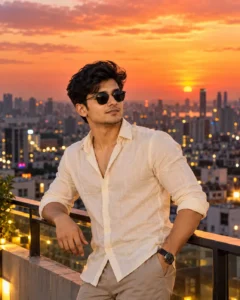
Warm sky above, cool city lights below. Works in both vertical and horizontal formats.
Reference photo attached. Hold his face, facial features and identity perfectly consistent with the original, so he looks like exactly the same person with no edits.
Create a premium photograph of him leaning on a rooftop railing at sunset, the skyline behind glowing orange and pink as city lights start to turn on. Cream linen shirt with sleeves pushed up, round dark sunglasses, a slight confident smile. Shot from a three-quarter angle at eye level, 70mm lens, soft golden key light on the face, bokeh city lights, realistic skin texture, 4:5 ratio.
12. Warm Café Terrace, Relaxed Candid
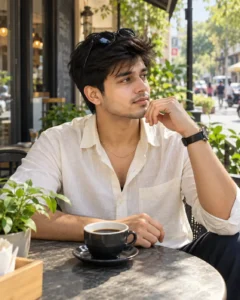
The trend without the drama: a natural, relaxed photo for everyday posting.
Keep his face and identity the same as in the original image, with every facial feature unchanged and no stylistic reshaping.
Create a natural candid-style photo of him sitting at a small outdoor café table in the morning, a cup of black coffee in front of him. Off-white shirt, a simple gold chain just visible at the neck, sunglasses pushed up on his head. Window-like soft daylight from the side, 35mm lens, slightly high angle, blurred street and plants behind, authentic skin tones, sharp details, 4:5 ratio.
How to Customize These Prompts
- Change the shirt color: Swap “white” for cream, sky blue, olive or black. Keep the fabric (linen or cotton) so the folds still look real.
- Remove the sunglasses: Replace “round black sunglasses” with “no sunglasses, eyes clearly visible” for a friendlier look.
- Switch the aspect ratio: 9:16 for Reels and Shorts, 4:5 for Instagram posts, 16:9 for YouTube thumbnails.
- Change the time of day: Golden hour is warm, blue hour is moody, and overcast gives the softest, most natural skin.
- Use it for a girl’s photo: Change “him” to “her” and adjust the outfit, for example a white linen shirt with wide-leg trousers.
Common Mistakes That Ruin the Result
- Uploading a blurry or heavily filtered photo. The model copies what it sees, so a soft source gives a soft result.
- Stacking too many locations in one prompt. One place, one light source and one mood works better than “rooftop plus forest plus car”.
- Removing the identity line. Without it, faces can drift toward a generic look.
- Repeating “4K, 8K, ultra realistic” over and over. One clear quality phrase is enough. Describe lens, light and texture instead.
FAQ
What is a Bodhi Kalpak prompt?
It is an AI photo prompt that restyles your own photo in the look of the Jailer 2 character Bodhi Kalpak: a white outfit, dark sunglasses and a cinematic car or street setting.
Who plays Bodhi Kalpak?
S. J. Suryah plays Bodhi Kalpak in Jailer 2.
Which AI tool works best for these prompts?
They are written for Gemini image editing (Nano Banana) and also work in ChatGPT image generation. Results vary by tool and by your source photo.
How do I keep my face looking like me?
Upload a clear photo, keep the identity line at the start of the prompt, and ask for small corrections one at a time instead of regenerating from scratch.
How do I get a sharper image?
Mention the lens, light direction and surface details such as skin texture and fabric folds, and download the highest-quality version your tool offers.