
Most family photo prompts fail for one simple reason: the faces change. You upload a nice picture, ask for a new style, and the result looks like a different family. Every prompt below is built to stop that. Each one asks the AI to keep faces and identities intact, then changes only the setting, light, pose or mood.
These prompts work with ChatGPT image generation, Google Gemini (Nano Banana) and most other image editors that accept a reference photo. Upload one clear family photo, paste a prompt, and adjust the details to match your people.
Quick Answer: What Makes a Good Family Photo Prompt?
A good family photo prompt has five parts: an instruction to keep the faces the same, the setting, the lighting, the pose or action, and the mood or style. Add clothing and camera angle if you want more control. Everything else is optional.
- Face lock: tell the AI to preserve faces and identities.
- Setting: studio, meadow, living room, festival, street.
- Light: golden hour, window light, single spotlight, candle glow.
- Pose: hugging, stacked heads, sitting on a sofa, walking together.
- Style: black and white, film look, editorial, cinematic.
How to Use These Prompts
- Upload a clear photo where every face is visible and well lit. Front-facing photos give the best likeness.
- Paste the prompt in the same message as the image.
- Change the number of people, ages and clothing colours to match your family.
- If a face drifts, send a follow-up such as “keep the faces closer to the original photo” and regenerate.
Best aspect ratio: 4:5 or 3:4 for Instagram and portraits, 16:9 for wide outdoor scenes, 1:1 for profile pictures.
Black and White Family Photo Prompts
Black and white is the most searched family style right now, especially the dark-background studio look and the stacked-faces pose. These three cover the main variations.
1. Dark Studio Family Portrait
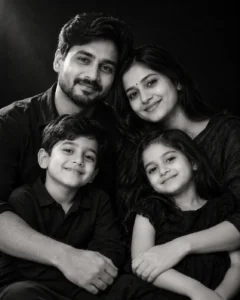
A moody black and white portrait where the family sits close together against a deep black backdrop. Good for wall frames and Instagram posts.
Use the attached reference image and keep every person’s face, facial features, and identity exactly the same, with no changes to their appearance. Turn the photo into a black and white studio family portrait against a deep black background. The parents sit close behind the children, arms wrapped around them, heads slightly tilted toward each other. Soft directional light from the upper left, gentle shadows on the faces, fine film grain, calm and warm expression on everyone. Vertical 4:5 framing, chest-up composition.
Best for: family of three to five, dark or plain clothing.
2. Stacked Faces Black and White Portrait
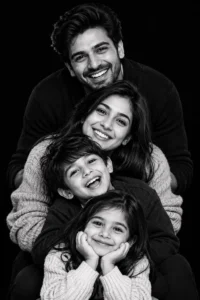
Faces stack vertically from the tallest at the top to the smallest at the bottom. It looks playful and is easy to recognise in the family trend.
Working from the uploaded photo, make sure each family member’s face and identity stays completely unchanged. Create a black and white vertical portrait where the faces are stacked in a column, the tallest person at the top and the youngest at the bottom, all leaning in toward the camera. Everyone has a different natural expression: a laugh, a gentle smile, a playful look. Pure black background, soft frontal light, sharp focus on the eyes, high contrast finish.
Tip: works best with three to five people. Mention who stands at the top so the order is right.
3. Hands Framing the Child Portrait
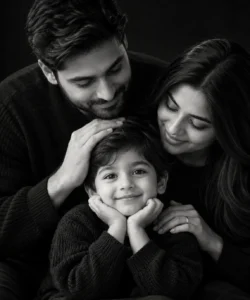
A minimal, emotional shot where parents’ hands frame a child’s face.
Based on the attached image, retain everyone’s face, features and identity precisely as they appear, without any alteration. Build a black and white portrait of a child in the centre with the parents’ hands resting gently on the child’s head and shoulders from behind. Tight close-up, 85mm lens look, shallow depth of field, single soft light from the front, black background, quiet and tender mood.
ChatGPT Family Photo Trend Prompts
The ChatGPT family trend is about turning an ordinary snapshot into a polished shoot: holiday sets, matching outfits, warm interiors. These prompts follow that idea.
4. Cozy Christmas Tree Portrait

Please use the attached reference photo and do not change any face, facial feature or identity. Place the family in front of a decorated white Christmas tree in a bright living room. Everyone wears cream and soft grey knitwear and sits on a rug with the children in front. Warm fairy lights glowing behind, soft window light, relaxed genuine smiles. Wide family-portrait framing at eye level, shot like a professional holiday card.
Best for: holiday cards and WhatsApp greetings.
5. Matching Beige Studio Shoot
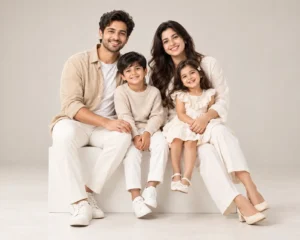
From the attached picture, keep all faces and identities identical to the original with zero modification. Restyle it as a clean studio family shoot on a pale seamless backdrop. Everyone wears coordinated beige and white outfits. Parents sit on a low white box with the children between them and on their laps. Bright, even softbox lighting, minimal shadows, natural smiles. Full-body, straight-on camera at chest height.
6. Living Room Candid Moment
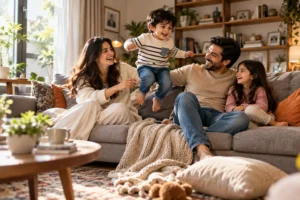
Treat the attached photo as the identity reference and leave every face and feature completely as they are. Show the family laughing on a sofa in a lived-in living room on a lazy Sunday afternoon, the child mid-jump between the parents, a blanket half on the floor. Side window light, natural colours, slight motion in the child. Candid documentary style, 35mm lens look, slightly off-centre composition.
Gemini and Nano Banana Family Prompts
Gemini responds well to clear instructions written as an edit (“transform”, “restyle”). These prompts are written that way.
7. Golden Hour Meadow Walk

Using the uploaded reference image, preserve each person’s face and identity without any change to how they look. Transform it into a golden hour family walk through tall dry grass. Parents hold the children’s hands, the family walks slowly toward the camera, sunlight glowing behind them with a soft rim light on hair. Warm earthy clothing, gentle breeze, shallow depth of field, 50mm lens look. Wide 16:9 frame.
8. Indian Festive Family Portrait
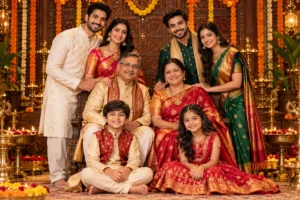
Good for Diwali, Navratri or a wedding-season family picture.
With the attached image as the reference, make sure faces, features and identity stay exactly true to the original. Create a traditional Indian festive family portrait: women in silk sarees, men in kurtas or sherwanis, children in matching ethnic wear. Everyone seated and standing in layers in front of an ornate wooden backdrop with marigold garlands and brass diyas. Warm lantern-style light, rich reds, golds and deep greens, formal straight-on composition with joyful smiles.
9. Three Generations Portrait
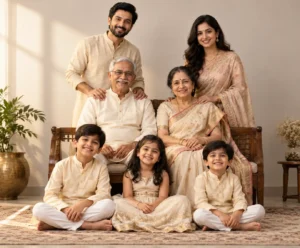
Keep the faces and identities from the attached photo unchanged, with no edits to anyone’s appearance. Arrange grandparents seated in the centre on a wooden bench, parents standing behind them with hands on their shoulders, and children sitting on the ground in front. Soft neutral studio background, warm window-style light from the left, dignified but affectionate expressions. Formal portrait, slightly elevated camera, sharp detail on faces.
Tip: mention who sits and who stands. Without it, AI often places older people at the back.
Outdoor and Seasonal Family Prompts
10. Autumn Park Leaf Toss

Reference photo attached: all faces and identities must remain exactly as in the original, nothing altered. Put the family in a park full of orange and gold autumn trees, tossing leaves into the air with the children laughing. Layered sweaters in rust, mustard and denim. Late afternoon backlight, leaves frozen mid-air, slightly low camera angle looking up, warm film-like colour.
11. Beach Sunset Silhouette and Detail

Use the uploaded image and hold every face and facial feature constant, so identities are unchanged. Show the family walking along a quiet beach at sunset, barefoot, holding hands in a line, light linen clothes moving in the wind. Sun low on the horizon, soft orange and pink sky, gentle waves reaching their feet. Wide angle from behind and to the side, faces still clearly visible in profile.
12. Snowy Winter Walk

Respect the attached photo as the identity source: the faces must stay identical, with no changes to appearance. Restyle it as a winter family walk through fresh snow, everyone in coats, scarves and beanies, the parent lifting a child on their shoulders. Pale blue overcast light, falling snow, breath visible in the cold. Medium-wide shot at eye level, muted cool tones with warm red scarves as colour accents.
Creative and Cinematic Family Prompts
13. Vintage 1970s Family Film Look
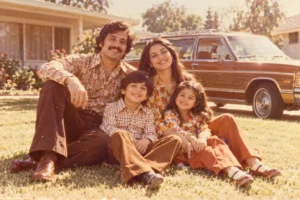
Take the attached reference image and ensure the faces and identities are preserved perfectly, with no visible change. Recreate the family as a 1970s snapshot on a sunny front lawn, faded warm colours, soft film grain, slightly overexposed highlights. Retro flared trousers, patterned shirts, a vintage station wagon in the background. Casual, slightly imperfect framing like a family album print.
14. Cinematic Movie Poster Family
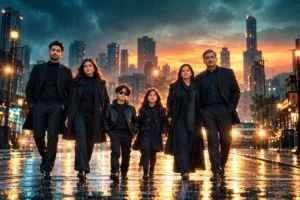
Treat the uploaded picture as the identity reference; every face must remain the same as the original. Turn the family into a cinematic poster: standing side by side in dark tailored outfits in a rain-lit city street at dusk. Teal and orange colour grade, soft haze, strong rim light from behind. Low camera angle, anamorphic feel. Leave space at the top for a title.
15. Polaroid Family Memory
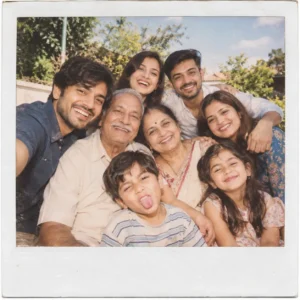
From the attached photo, keep the identity and facial features of each person exactly as they are, without any modification. Create a square Polaroid-style family picture with a white border, taken outdoors on a summer afternoon. Everyone squeezed into the frame, laughing, one child making a face. Soft flash, slightly washed colours, handwritten caption space at the bottom.
16. Baby Milestone Family Portrait

Using the attached reference, never alter faces or identity: each person must look the same as in the original. Create a soft portrait around a newborn or baby held in the mother’s arms, with the father wrapping both from behind. Cream neutral clothes, plain warm-white backdrop, diffused window light, very shallow depth of field focused on the baby’s face. Intimate close framing, gentle and quiet mood.
Common Mistakes That Change the Faces
- Using a blurry or side-angle reference. The AI has to guess, and guesses drift.
- Asking for too many changes at once. Change the setting and the light first. Add the outfit and the pose in a second pass.
- Adding beauty words such as “flawless” or “perfect skin”. These often smooth and alter faces.
- Not saying how many people. State the count, or people get added or removed.
- Extreme close-ups of large groups. Faces get smaller and less accurate. Use half-body or wide framing for groups of five or more.
Ways to Customise Any Prompt
- Swap the location: studio, terrace, garden, temple courtyard, mountain trail.
- Change the lens feel: 35mm for candid, 85mm for portraits, wide for landscapes.
- Change the palette: earthy neutrals, white and denim, festive reds and golds.
- Add a pet or a specific prop, and describe where it sits.
FAQ
What is the best prompt for a family photo?
One that keeps the faces locked and describes a single clear scene: setting, light, pose and mood. Prompt 1 (dark studio) and prompt 7 (golden hour meadow) are good starting points.
Can I use these prompts in Gemini?
Yes. Upload the photo in Gemini, paste the prompt in the same message and generate. They also work in ChatGPT and most editors that support a reference image.
Why do faces still change sometimes?
AI image models can drift, especially with small faces, low-quality photos or very heavy style changes. Use a sharper reference, simplify the prompt and try again.
Do I need a photo of everyone together?
Ideally yes. If not, upload separate clear photos and say who is who in the prompt.
Final Thoughts
Start with one prompt, check that the faces match, then experiment with the light and location. Small changes, such as moving from a studio to golden hour, can give a completely different result.

